
Key takeaways
- 01AI video generators turn text, images or audio into moving video.
- 02Clip generators make single shots. Full studios make finished videos.
- 03The hard part is not one clip. It is keeping a story consistent across many clips.
The main types of AI video generators
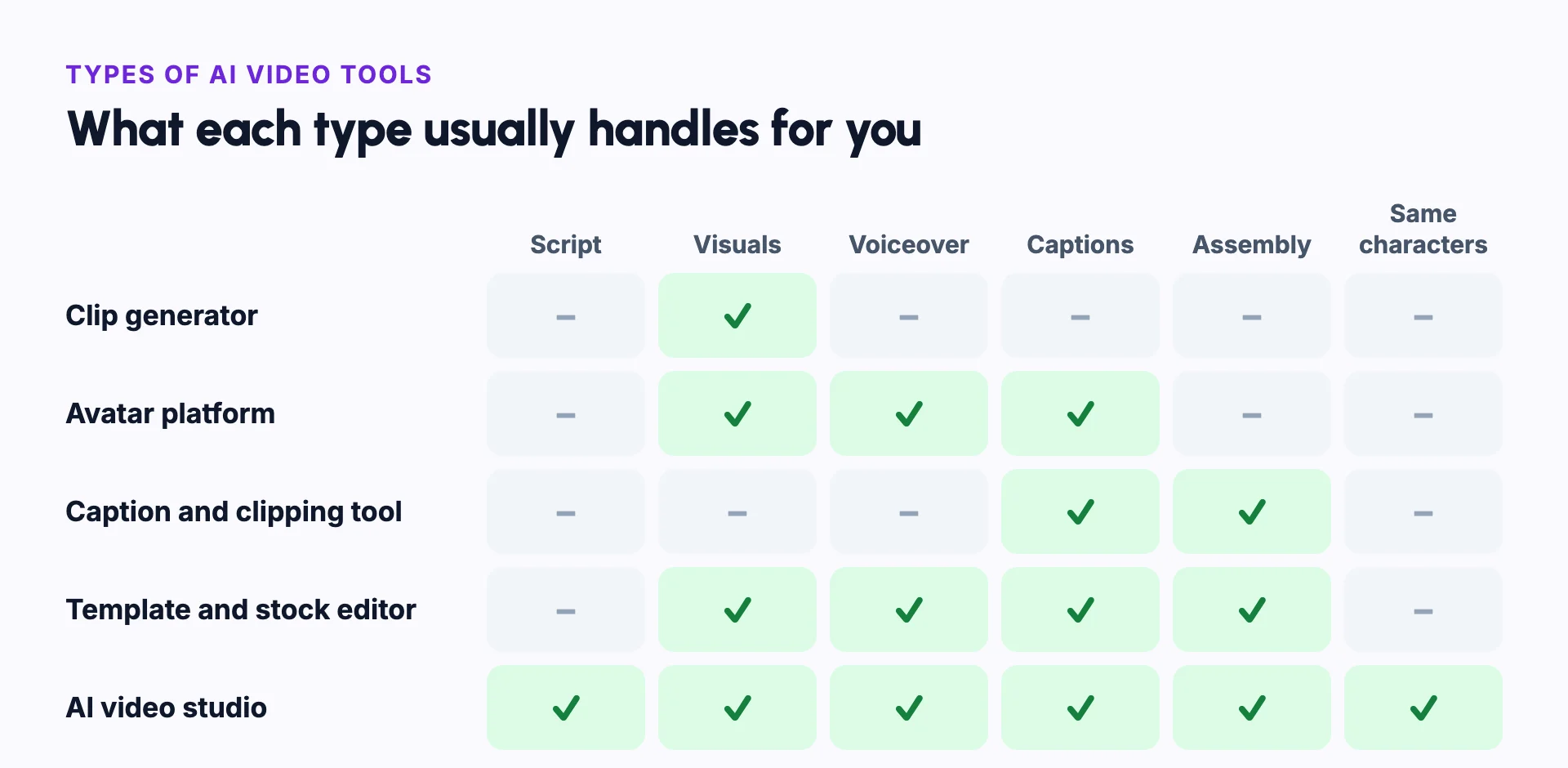
AI video tools fall into a few groups. Each group solves a different problem.
- Clip generators make one short clip from a prompt or an image. Scripting, voice, captions and editing are left to you.
- Avatar platforms make presenter videos, where a digital person talks to the camera.
- Caption and clipping tools edit footage you already filmed.
- Template and stock editors assemble stock clips around a script.
- AI video studios take an idea, a script or a song and produce a finished, narrated video. These workflows are called idea to video and script to video.
What to look for
Start with the video you want to publish, not the model behind the tool. A single beautiful clip is easy to get today. A two-minute story, like an AI short film, with the same character in every shot is much harder.
Check four things: whether characters stay the same across scenes, whether you can fix one scene without redoing the whole video, whether you see the cost before you generate, and what resolution the final video renders in.
Example: choosing a tool for a weekly story series
Say you want to post a two-minute animated story every week, with the same two characters.
A clip generator gives you beautiful single shots. You would still write the script, keep the characters the same, record a voice and edit every clip together yourself. An avatar platform makes presenter videos, which do not fit a story.
An AI video studio fits this job best. It plans the scenes, reuses the characters, and adds voice, captions and music. If you only need one striking shot for an ad, a clip generator is the simpler choice.
What AI video costs
Most tools charge with a subscription, credits, or both. This is called credit-based pricing.
Longer videos, animated scenes and higher resolutions cost more than short videos made from still images. Check the cost before you generate, because an unwanted clip usually costs the same as a good one.
AI video generator vs AI video editor
| AI video generator | AI video editor | |
|---|---|---|
| Starts from | A prompt, a script, an image or a song | Footage you already have |
| Makes new visuals | Yes, every shot is generated | Rarely. It cuts and improves what exists |
| Best for | Stories, explainers and videos with no camera | Trimming, captioning and reusing recordings |
| Example task | Turn a script into a narrated video | Cut a long podcast into short clips |
Common mistakes
Choosing a tool by its model name
Start from the video you want to publish. The best clip model does not help if you still have to assemble dozens of clips by hand.
Not testing characters across scenes
Make a short test story with one character in several scenes before you commit to a tool. See character consistency.
Ignoring the export format
Check the final resolution and the aspect ratios before you start, so the video fits where you publish.
Generating before reviewing the plan
Read the script and the scene plan first. Fixing a plan is faster and cheaper than regenerating video.
Expecting one prompt to make a finished video
Plan time to review and fix scenes. AI output varies from one generation to the next.
In Frameloop
How it works in Frameloop
- Frameloop is an AI video studio. It turns an idea, a script or a song into a finished video.
- It plans the scenes and shots, writes the prompts, and adds voiceover, captions and music.
- Characters you save look the same in every scene, video and episode.
- You see the credit cost before you generate, and you can edit any scene before you render.
- Final videos render as MP4 in 1080p.
Questions people ask
What is the best AI video generator?
It depends on the video. Clip generators suit single shots, avatar platforms suit presenter videos, and AI video studios suit finished stories and explainers with recurring characters.
Can AI make a full video from text?
Yes. Some tools take a prompt or a script and return a finished video with visuals, voiceover, captions and music. Others only make short clips that you assemble yourself.
How long can an AI-generated video be?
Single generated clips usually last a few seconds. Tools that plan and join many scenes can make videos of several minutes or more.
Do I need editing skills?
Not for a basic video. It helps to review each scene, replace weak shots and tighten the script. That takes judgment more than editing skill.