Key takeaways
- 01MCP is an open standard for connecting AI assistants to tools.
- 02An MCP server offers tools. An MCP client, like an AI assistant, calls them.
- 03One server works with every client that supports MCP.
How MCP works
Before MCP, every AI app needed its own custom connection to every tool.[2] MCP gives them one shared way to talk.
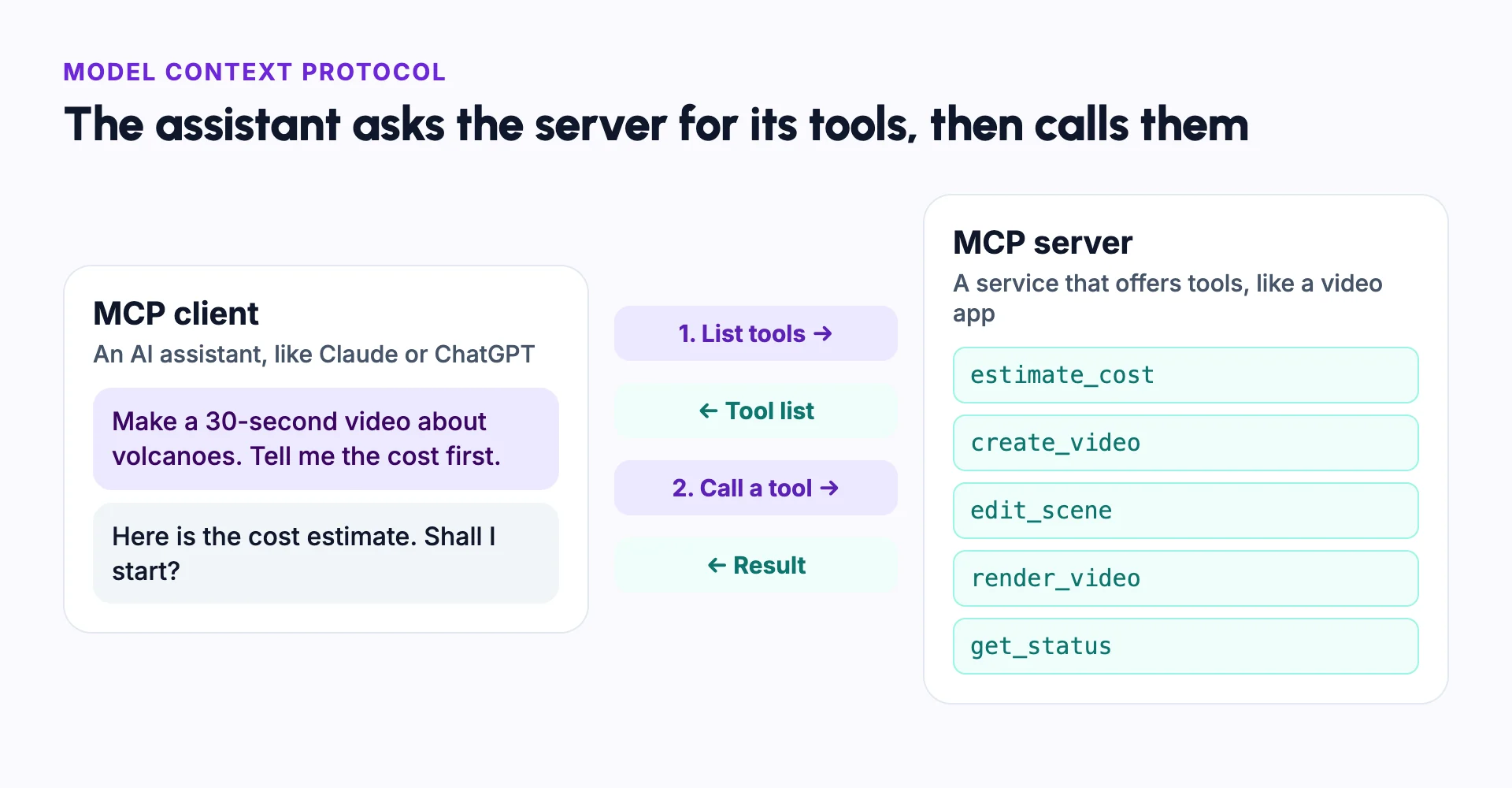
A company runs an MCP server that describes its tools: what each one does and what it needs. The AI assistant reads that list and decides which tool to call to finish the user's request.[1]
The parts of MCP
MCP has a few named parts.[1]
- Host: the app you talk to, like Claude Desktop or an AI code editor.
- Client: the part of the host that connects to one MCP server.
- Server: a program that offers tools and data to the AI, like a video app's MCP server.
- Tools: actions the AI can take through a server, like estimating a cost or creating a video.
Why MCP matters for video
Making a video with an AI video generator takes many steps: planning, generating, editing and rendering. An MCP server lets an AI agent run all of them from a single chat. Developers can use the same tools to build their own YouTube automation.
Because generation costs money, a good video MCP server lets the agent check the cost first and set a spending limit.
Example: making a video from a chat
You type: "Make a 30-second video about volcanoes. Tell me the cost first."
The assistant asks the video app's MCP server for its tools. It calls the cost tool and shows you the estimate. When you say yes, it calls the create tool, then checks the status until the video is ready.
You never open the video app. If a scene needs changing, you ask in the same chat, and the assistant calls the edit tool.
MCP vs an API
| MCP | API | |
|---|---|---|
| Used by | AI assistants and AI agents | Code that a developer writes |
| Finding what it can do | The AI asks the server for its tools | A developer reads the docs |
| Setup | Add a server address to your AI app | Write code that calls each endpoint |
| Relationship | Often built on top of an existing API | Can work without MCP |
Common mistakes
Connecting servers you do not trust
Only add MCP servers from sources you trust. Tools can act on your accounts.
Letting the AI spend without a check
Ask for a cost estimate first, and approve before anything that uses credits.
Vague requests
Say the length, the format and the style you want, just as you would to a person.
Giving more access than needed
Connect only the servers a task needs, and review their permissions.
Assuming every AI app supports MCP
Check that your assistant or editor supports MCP servers before you set one up.
In Frameloop
How it works in Frameloop
- Frameloop has a remote MCP server at https://frameloop.ai/api/mcp.
- It works with Claude, ChatGPT, OpenAI Dots, Claude Code, Cursor, Grok, Meta Muse, Hermes Agent, OpenClaw and any MCP client.
- Agents can create videos, music videos and short films, generate Studio media, edit projects, render and check credits.
- Every paid action can be estimated first, each request can have a spending cap, and retried requests are never charged twice.
- MCP and API access are included on all paid plans.
Questions people ask
Who created the Model Context Protocol?
Anthropic introduced MCP in November 2024 as an open standard.[2] Many AI apps and tools now support it.
Do I need to code to use MCP?
No. In most AI apps, you add a server address in the settings and sign in. Building your own MCP server does need code.
What is the difference between MCP and an API?
An API is made for code a developer writes. MCP is made for AI assistants, which ask the server what tools it has and choose when to use them.
Can I make videos with MCP?
Yes, if a video app offers an MCP server. You ask in a chat, and the assistant calls the app's tools to plan, make and render the video.
Sources
- [1]Model Context Protocol documentation, modelcontextprotocol.io
- [2]Introducing the Model Context Protocol, Anthropic