
Key takeaways
- 019:16 is the standard ratio for Shorts, TikTok and Reels.
- 02It fills the whole phone screen, with no black bars.
- 03Plan framing for vertical. Wide shots cropped to 9:16 lose the subject.
Why vertical video took over
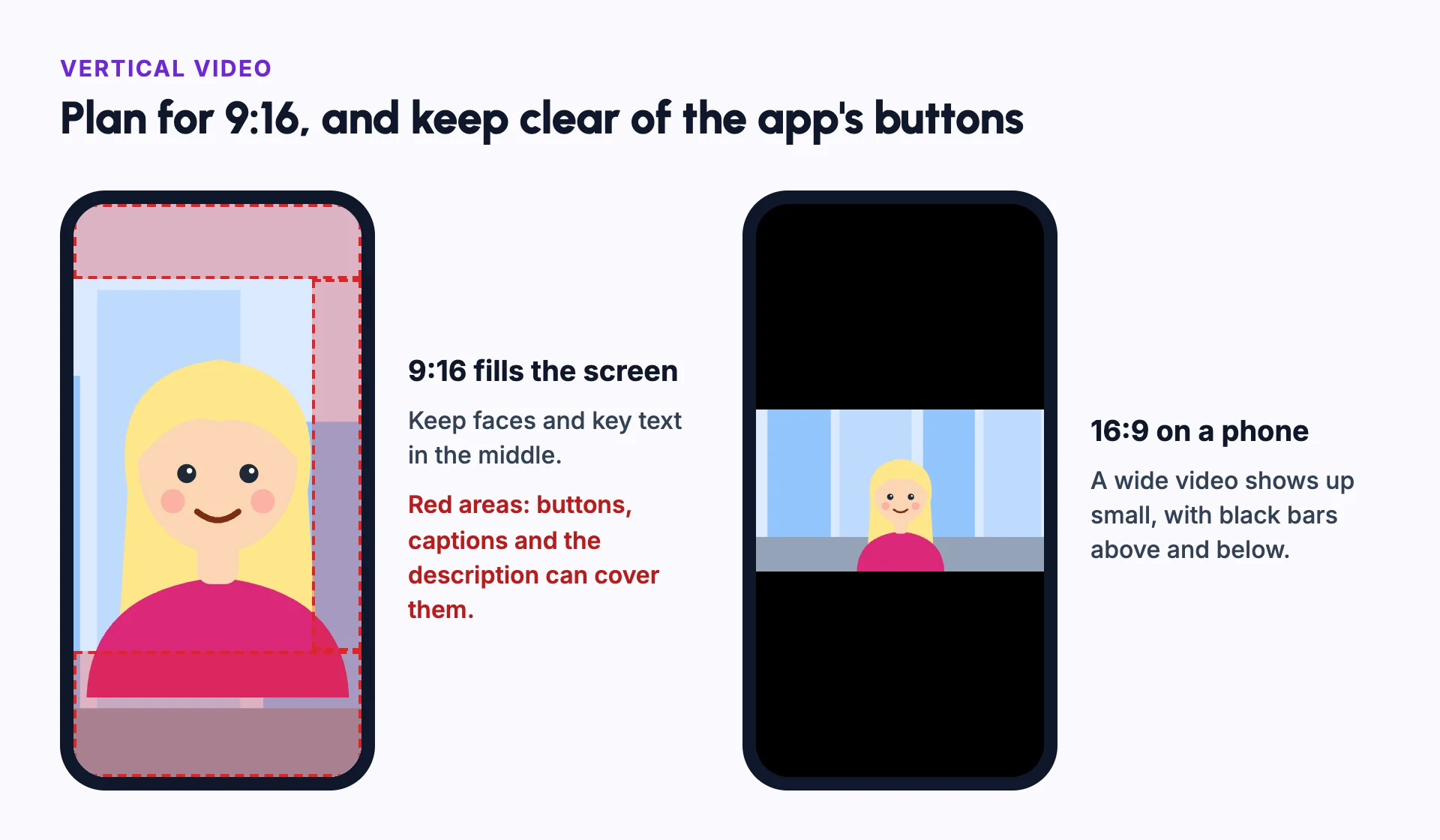
Most people hold their phone upright. A vertical video fills the screen, while a wide video shows up small with black bars.
Short-form feeds are built around vertical video, so it is now the default for social content, from faceless videos to micro dramas. YouTube, for example, lets you upload vertical videos as Shorts.[1]
How to plan for vertical
Keep the subject in the middle of the frame. Leave space at the top and bottom, because the platform's buttons and captions sit there.
Use close-ups and medium shots. Wide landscapes lose detail in a narrow frame. The aspect ratio decides how much of a scene fits.
Make captions large and easy to read. Many people watch with the sound off.
Common sizes
Vertical video uses the 9:16 aspect ratio. Most platforms ask for 1080 by 1920 pixels.
- 9:16 (1080 by 1920): YouTube Shorts, TikTok, Instagram Reels and Stories.
- 4:5 (1080 by 1350): Instagram and Facebook feed posts.
- 1:1 (1080 by 1080): square posts that work in most feeds.
- 16:9 (1920 by 1080): regular YouTube videos and TVs.
Example: turning a wide scene vertical
A 16:9 scene shows Maya on the left and Leo on the right, talking across a café table. Cropped to 9:16, only one of them fits.
There are three ways to fix it. Cut between two close-ups, one for each person. Reframe the shot so they stand closer together. Or plan the scene as vertical from the start.
Planning vertical from the start gives the best result. Faces are larger, and nothing important is lost at the edges.
If you publish both formats, make the vertical version its own edit. A vertical cut is usually shorter, with a faster start and larger captions, because people scroll past it in a feed.
Check the result on a real phone before you post. Text that looks large on a laptop can be hard to read in your hand.
Vertical vs horizontal video
| Vertical (9:16) | Horizontal (16:9) | |
|---|---|---|
| Best for | Phones, Shorts, Reels and TikTok | YouTube long videos, TVs and laptops |
| Typical length | Seconds to a few minutes | Minutes to hours |
| Framing | One subject, close up | Wide scenes and several people |
| Captions | Large, in the middle | Smaller, near the bottom |
Common mistakes
Putting text at the edges
Keep captions and titles in the middle, away from buttons and the description.
Cropping a wide video without reframing
Reframe each shot so the subject stays in view.
Using small text
Make text large enough to read on a phone at arm's length.
Wide shots with tiny people
Use more close-ups and medium shots in vertical video.
A slow start
Vertical feeds move fast. Put the hook in the first second.
In Frameloop
How it works in Frameloop
- Frameloop videos can be vertical (9:16), square (1:1), wide (16:9) or other formats.
- You pick the aspect ratio when you create the video, and you can change it in the editor.
- Audio Visualizer videos come in 16:9, 9:16 or 1:1.
- You can publish to YouTube directly from Frameloop.
Questions people ask
What size is a vertical video?
The standard is 9:16, usually 1080 by 1920 pixels.
How long can a YouTube Short be?
YouTube Shorts can be up to three minutes long, in a square or vertical format.[1] Many Shorts are much shorter.
Can I post the same vertical video to TikTok, Reels and Shorts?
Yes, the 9:16 format works on all three. Check each platform's length limit and remove other apps' watermarks.
Should every video be vertical?
No. Long videos, tutorials with screens and anything watched on a TV usually work better horizontal.
Sources
- [1]Get started creating YouTube Shorts, YouTube Help