
Key takeaways
- 01A storyboard plans every shot before production starts.
- 02It catches story and pacing problems while they are still cheap to fix.
- 03In AI video, a storyboard is a review step before you spend credits on animation.
What goes in a storyboard
Each panel is one shot. The panels are numbered and read in order, like a comic. In AI video, the panels also let you check character consistency before anything is animated.
- The image: who is in the shot and what they are doing.
- The framing: wide shot, medium shot or close-up, and the camera angle.
- Notes: dialogue, sound, camera movement and how long the shot lasts.
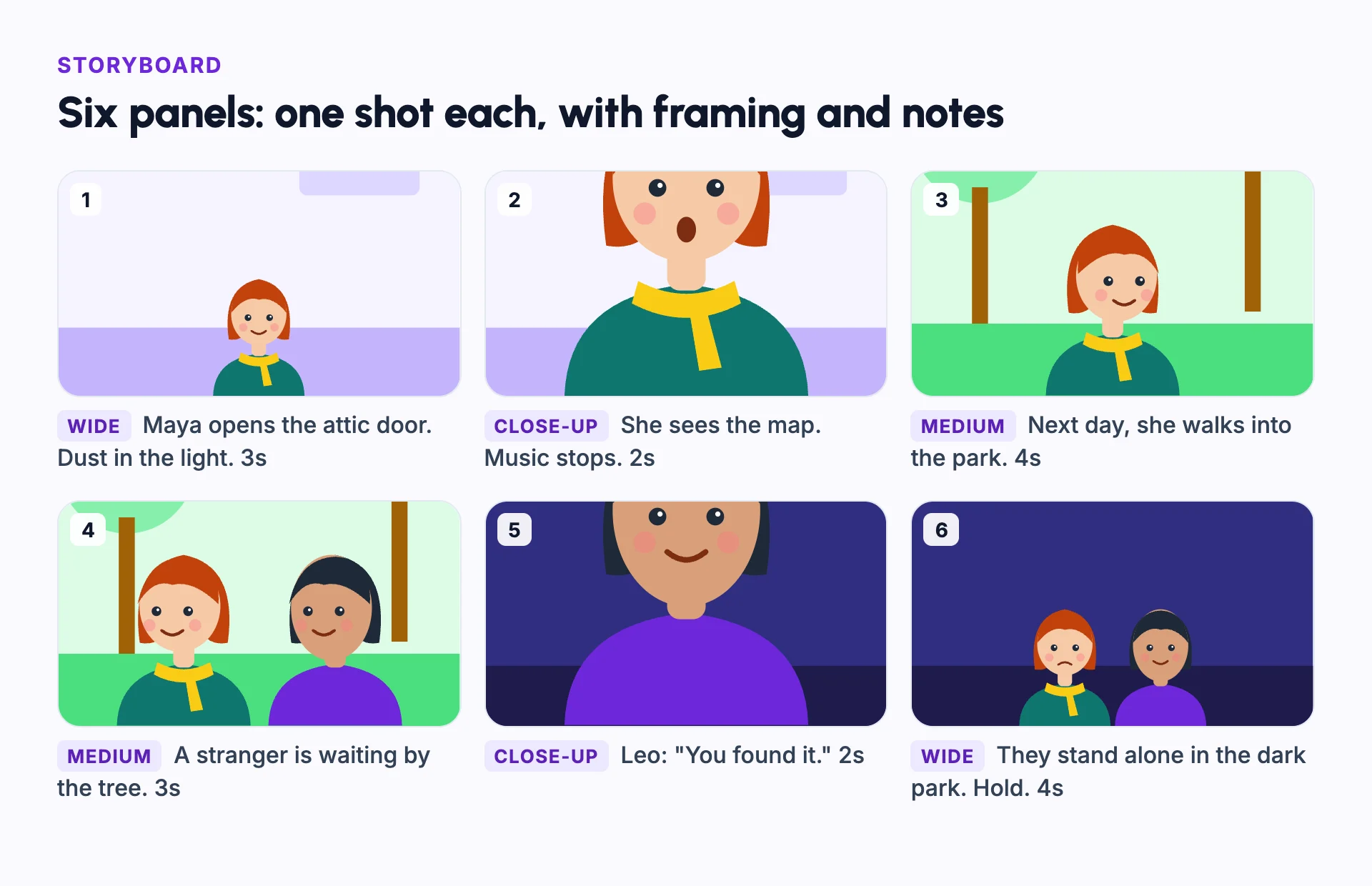
Example: a six-panel scene
The storyboard above plans one short scene. Panel 1 is a wide shot that shows the place. Panel 2 cuts to a close-up of Maya's reaction. Panels 3 and 4 move the story to the park and bring in Leo.
Panel 5 gives Leo's line in close-up, and panel 6 pulls back to a wide shot to end the scene.
Each note says how long the shot lasts. Added up, the scene runs about 18 seconds, and you know that before you make anything.
If the scene feels too long, you can cut a panel now, before any video is made.
Why storyboards matter even more for AI video
In film, a storyboard is part of previsualization and saves time on set. In AI video, it saves money.
Animating a scene costs far more than making a still image. Reviewing the panels first means you only animate scenes you are happy with. This matters most for an AI short film, where every scene is animated.
How to make a storyboard
- Break the script into shots: one action or one line of dialogue per shot.
- Pick a framing for each shot: wide to show the place, medium for action, close-up for emotion.
- Add notes for dialogue, sound and length.
- Read the panels in order, and cut any panel that does not move the story.
Storyboard vs shot list
| Storyboard | Shot list | |
|---|---|---|
| Format | Pictures, one panel per shot | A table of text |
| Shows | What each shot looks like | What each shot needs: framing, length and notes |
| Best for | Checking the story flow and the framing | Planning and tracking production |
Common mistakes
Using the same framing for every shot
Mix wide, medium and close-up shots. Variety keeps a scene alive.
Leaving out timing
Note how long each shot lasts, so you know the length of the scene before you make it.
Polishing the drawings
Rough sketches are fine. The order and the framing matter more than the art.
Too many panels for one moment
If several panels show the same beat, merge them.
Animating before the storyboard is approved
Review the panels first. Changes are cheap on paper and expensive in animation.
In Frameloop
How it works in Frameloop
- AI Short Films include a storyboard step with numbered panels.
- You review the scene plan, dialogue and character sheets, then the storyboard, then a preview, before the final film is made.
- AI Short Films need a paid plan.
Questions people ask
What is the purpose of a storyboard?
To plan every shot before production, so you can fix story and pacing problems while they are still cheap to change.
Do I need to draw well to make a storyboard?
No. Stick figures, rough sketches or AI images all work. What matters is the framing and the order of the shots.
What is the difference between a storyboard and an animatic?
An animatic is a storyboard turned into a rough video, with timing and sound, so you can feel the pace.
How many panels does a storyboard need?
One per shot. A short scene might need five or six panels. A full film needs many more.