
Key takeaways
- 01Lip sync makes a character look like they are really speaking or singing.
- 02AI lip sync reads the audio and animates the mouth to match.
- 03It matters most for music videos and dialogue scenes.
Why lip sync matters
Viewers notice when a mouth does not match the sound. Even a small delay makes a scene feel fake.
In music videos, lip sync turns a static character into a singer. In films, it lets characters deliver their own lines on screen.
How AI lip sync works
The AI listens to the audio and works out which mouth shapes each sound needs. It then animates the character's face so the shapes line up with the sound.
Good results need a clear view of the face and clean vocals. Fast music or heavy effects on the voice make lip sync harder.
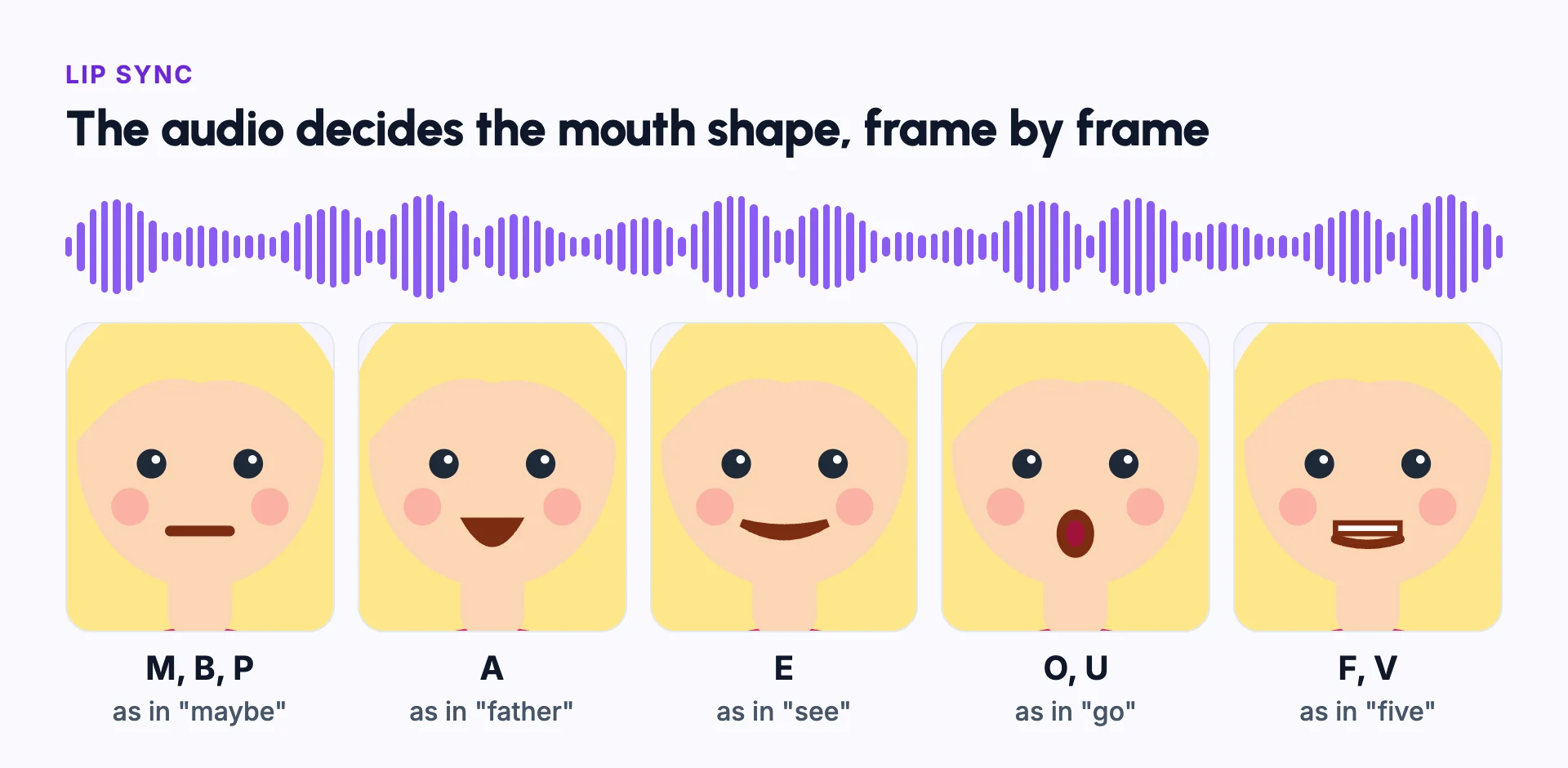
Mouth shapes, or visemes
Speech sounds map to a small set of mouth shapes, called visemes. M, B and P close the lips. A opens the jaw. E stretches the lips wide. O and U round them. F and V put the top teeth on the lower lip.
Lip sync does not need a new shape for every letter. It needs the right shape at the right moment. A mouth that is a few frames late looks more wrong than a shape that is slightly off.
Example: one sung line
Take the line "Maybe five more minutes." The lips close for the M, open for "may", stretch for "be", show the teeth for the F in "five", and close again for the M in "more" and "minutes".
A singer holds vowels longer than a speaker does. So in a song, the mouth stays open longer on each long note.
Fast rap verses are the hardest case. The mouth has little time for each shape, so small timing errors show more.
Lip sync vs dubbing
| Lip sync | Dubbing | |
|---|---|---|
| What changes | The character's mouth moves to match the audio | The audio is replaced with a new voice or language |
| Used for | Music videos and talking characters | Translating films and videos |
| Together | Often added after dubbing, so the mouth matches the new language | Without lip sync, the mouth no longer matches the words |
Common mistakes
Using shots where the face is small
Lip sync needs a clear view of the mouth. Use it on close-ups and medium shots that face the camera.
Burying the vocals in the mix
Give the tool a clean vocal track if you can. Loud music and heavy effects confuse it.
Lip-syncing every shot
Use it where the singer's face is visible. Wide shots and cutaways do not need it.
The wrong character singing
In duets, check that each line is sung by the right character.
Ignoring the cost
Lip sync usually costs more than a still scene. Save it for the shots that need it.
In Frameloop
How it works in Frameloop
- Music videos can use optional lip sync, so the singers' lips match the vocals.
- Lip sync always runs on the Max animation tier, so it costs more credits than still scenes.
- In AI Short Films, characters speak their own lines in their own voices.
- Lip sync needs a paid plan.
Questions people ask
Does AI lip sync work for singing?
Yes. Singing is harder than speech because of fast lyrics and long notes, so a clean vocal track gives better results.
Does lip sync work in other languages?
Yes. The mouth follows the sounds in the audio, not the language, so it works with translated or dubbed audio.
Why does my lip sync look wrong?
Common causes: the face is small or turned away, the vocals are buried under music, or the audio and video are out of step.
Do talking characters always need lip sync?
No. Many scenes cut between faces and reactions. Lip sync matters most in close-ups of the person speaking.