

Avinash Vagh

Not every AI video tool is built for the same job.
That is the biggest mistake most Frameloop vs Pictory AI comparisons make. They treat both tools like generic “text-to-video” software, then compare features line by line without asking the only question that matters:
Are you repurposing existing content, or creating original videos from scratch?
If you are turning blog posts, webinar recordings, scripts, PPTs, or podcast clips into videos, Pictory has a clear advantage. Its transcript-based editing and content repurposing workflow are built exactly for that.
But if you are creating original AI shorts, faceless videos, ads, stories, or cinematic social content, Frameloop is the stronger fit. It gives you scene-level control, reusable characters, 32-language support, and a creator-first workflow where you can fix one scene without disturbing the rest of the video.
That difference sounds small until you are producing at volume.
The real friction with Pictory does not show up in the first test video. It shows up when scene 3 looks wrong, the visual style breaks, the voiceover needs a small change, or the AI-selected footage does not match your story. Pictory is fast when you accept the auto-generated structure. Frameloop is faster when you need to direct the final output.
So here is the direct answer:
Pictory is better for repurposing long-form content. Frameloop is better for creating original AI videos with scene-level creative control.
This comparison breaks down every meaningful difference between Frameloop and Pictory AI: editing workflow, pricing, cost per video, free access, language support, API access, enterprise features, and the exact use cases where each tool makes sense.
If you are already searching for a Pictory alternative, the sections below show where Frameloop wins, where Pictory still has the edge, and which platform actually fits your video workflow in 2026.
Key Takeaways

Pictory launched in 2019 and has built a real user base. Its site says it is trusted by 20,000+ companies, and G2 lists Pictory at 4.6/5 from 82 verified reviews. Pictory’s core workflow works especially well for a specific type of creator: someone who already has content and wants to turn it into video quickly.
Paste a script, blog post URL, PPT, or long-form recording into Pictory and it helps generate a video from that source material. Stock visuals are selected, AI voiceover can be added, captions sync, and the final output can be exported without needing a traditional editing timeline. For content teams repurposing a webinar, podcast, or blog post into social clips, that speed is genuinely useful.
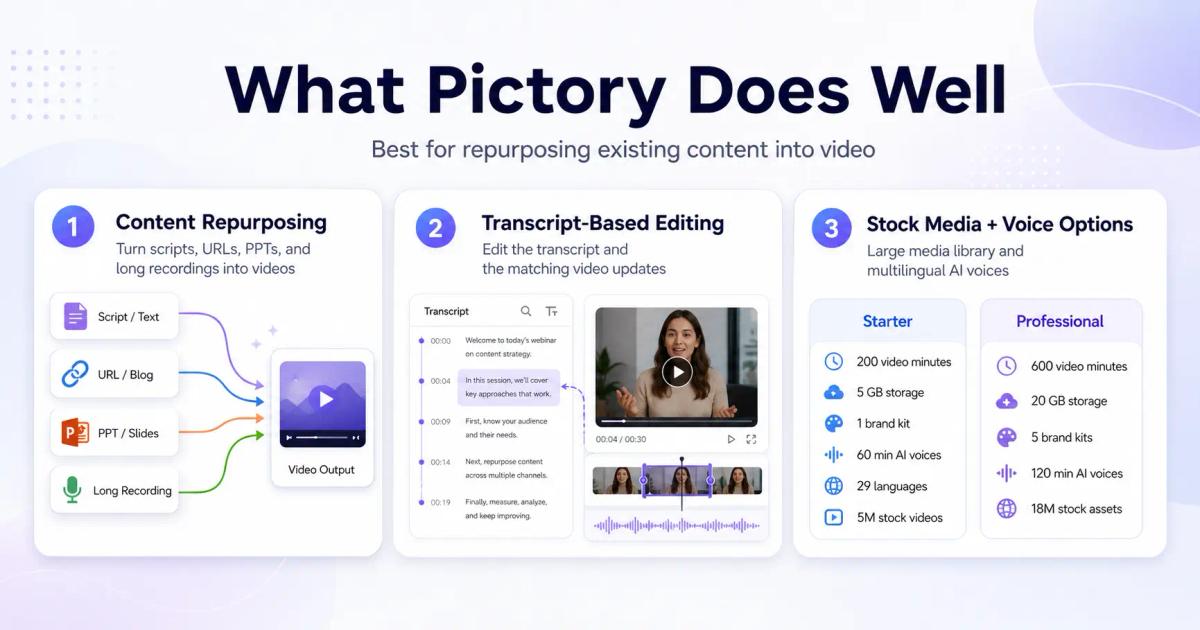
Pictory’s strongest feature is content repurposing. It is built for turning existing assets such as scripts, URLs, PPTs, and long recordings into videos without forcing users to learn Premiere Pro or a complex timeline editor.
Its transcript-based editing workflow is also a real advantage. When you edit the transcript, the matching part of the video changes with it. For podcast repurposing, webinar highlights, talking-head clips, and educational content, that can turn a multi-hour editing job into a much faster workflow.
Pictory also has strong stock media access and voice options. The Starter plan includes 200 video minutes, 5 GB storage, 1 brand kit, 60 minutes of ElevenLabs AI voices in 29 languages, and 5 million videos from Getty Images and Storyblocks. Professional increases that to 600 video minutes, 20 GB storage, 5 brand kits, 120 ElevenLabs voice minutes, and 18 million stock assets.
Pictory’s strength is also its limitation. It is excellent when you already have source content to repurpose, but it is less ideal when you want to direct original AI videos scene by scene. Pictory can generate and edit scenes, but its core value is still text, transcript, URL, PPT, and recorded-content workflows.
That matters when the output needs creative direction. If you are building a faceless story short, cinematic ad, or original AI video series, you usually care about more than turning text into a clean video. You care about how each scene looks, whether the character stays consistent, whether scene 3 matches the visual tone of scene 1, and whether one weak scene can be fixed without disturbing the full video.
The language comparison also needs nuance. Pictory does not simply “limit non-English support to Professional.” Its Starter plan includes 60 minutes of ElevenLabs AI voices in 29 languages, while Professional includes 120 minutes, and Team includes 240 minutes. The real constraint is voice-minute allowance and voice type, not basic language access alone.

Frameloop is an AI video creation platform built around scene-based editing. Instead of treating a video as one auto-generated sequence, Frameloop breaks the video into editable scenes so creators can refine specific parts of the output.
Frameloop is designed for creators, marketers, and growth teams who want to make original AI shorts, ads, stories, tutorials, and faceless videos. The product supports 32 languages, reusable characters, 1080p exports on higher plans, API access on paid plans, and commercial rights.
Pricing starts at $19/month for Basic, which includes 250 credits per month, roughly 5 AI animation videos or 50 AI faceless videos based on 30-second videos. Standard costs $39/month and includes 600 credits per month, roughly 12 AI animation videos or 120 AI faceless videos.
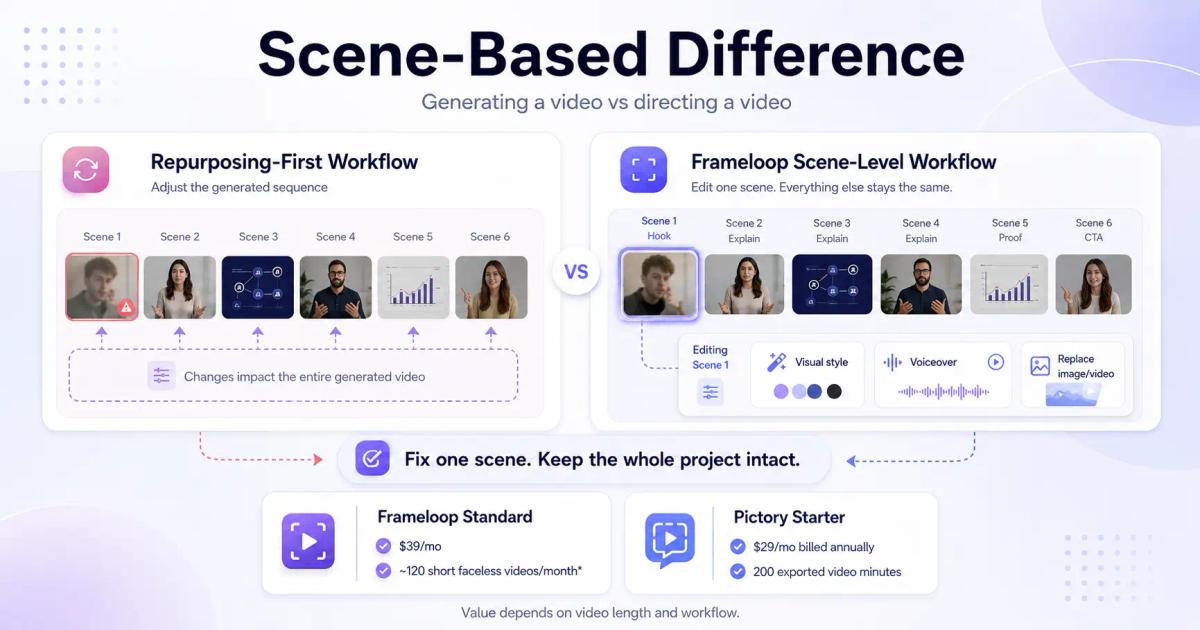
Take a concrete example. You create a 60-second video with a hook in scene 1, an explanation in scenes 2-4, a visual proof point in scene 5, and a CTA in scene 6. The hook does not land visually.
In a repurposing-first workflow, you usually adjust the script, visual selection, or video settings around the generated sequence. In Frameloop, you work at the scene level. You can open scene 1, adjust the visual style, change the voiceover, replace the image or video, and keep the rest of the project intact.
That is the difference between generating a video and directing a video. Pictory is strong when the goal is to convert existing content into video. Frameloop is stronger when the goal is to create original video content with human control over the final result.
This is why the cost-per-video math matters. Frameloop’s Standard plan gives roughly 120 short faceless videos per month for $39/month, based on 30-second videos. Pictory’s Starter plan gives 200 exported video minutes for $29/month billed annually, so the value depends heavily on video length and how much source-content repurposing you do.
Frameloop lets users start free with no credit card needed. That makes it easier to test the scene-based workflow before committing to a paid plan.
Pictory offers a 14-day free trial with 15 video minutes, a 5-minute max video length, and 720p export, according to its pricing page. Paid Pictory plans include no watermark, so the old claim that Pictory watermarks paid exports should not be used.
The better comparison is this: Pictory’s free access is a limited-time trial, while Frameloop is positioned around starting free without requiring a credit card. For creators evaluating multiple AI video tools, that lower-friction entry point matters.
Here's every meaningful difference in one table, then the context behind the numbers that matter most.
| Feature | Frameloop | Pictory AI |
|---|---|---|
| Best use case | Creating original AI shorts, ads, stories, and faceless videos with scene-level control | Repurposing scripts, blogs, URLs, PPTs, and recordings into videos |
| Main strength | Scene-based creative control | Transcript, blog, URL, and PPT-to-video workflows |
| Starting annual price | $19/month | $29/month standard annual price |
| Free option | Start free, no credit card needed | 14-day free trial |
| Pricing model | Monthly credits | Monthly exported video minutes |
| Entry allowance | 250 credits/month | 200 video minutes/month |
| Entry output estimate | ≈5 AI animation videos or ≈50 AI faceless videos, based on 30-second videos | Up to 200 exported video minutes |
| Max video length | 2 minutes on Basic, up to 15 minutes on Max | 30 minutes on paid plans |
| Scene-level editing | Yes, built around independent scene control | Limited compared with Frameloop; Pictory focuses more on text/transcript-driven editing |
| Transcript editing | No | Yes |
| Blog/URL-to-video | No | Yes |
| PPT-to-video | No | Yes |
| Languages | 32 languages | ElevenLabs voices in 29 languages; standard voices in 7 languages on higher tiers |
| AI voices | Included in Frameloop workflow | ElevenLabs voice minutes included by plan |
| Consistent characters | 5 to 100 reusable characters, depending on plan | Not positioned as reusable consistent characters |
| API access | Listed on paid plans | Separate API pricing mentioned, not clearly included in standard paid plans |
| Resolution | 720p on Basic AI animated videos, 1080p on Standard+ | 1080p on paid plans |
| Stock media | Not emphasized in pasted pricing | Getty Images + Storyblocks included |
| Brand kits | Not emphasized in pasted pricing | 1 to 10 brand kits depending on plan |
| Team features | Max plan for power users and teams | Dedicated Team plan with workspace, shared assets, onboarding, and training |
| Enterprise features | Custom video generation credits, custom AI voice, avatar and style training, priority support, dedicated account manager, API access with higher/custom rate limits and integrations | Pictory Central, SCORM export, quizzes, CTAs, SSO, dedicated success manager |
This number doesn't appear in most comparisons, but it's the most important one for creators producing at volume.
Pictory's Starter plan at $29/month billed annually includes 200 video minutes per month. That works out to roughly $0.145 per exported minute on paper, before you account for unused minutes, revisions, discarded drafts, or videos that need another pass.
Frameloop's Basic plan at $19/month includes 250 credits per month, which translates to roughly 50 AI faceless videos based on 30-second videos. At the Standard plan, $39/month includes 600 credits per month, or roughly 120 AI faceless videos. That puts short faceless video production around $0.38 per video on Basic and $0.33 per video on Standard, before iteration.
For a creator producing 100 short faceless videos a month, Frameloop's Standard plan covers the full volume inside one $39/month plan. With Pictory, the cost depends heavily on video length because the plan is based on exported minutes, not video count.
Pictory's language support is structured around voice type and plan limits. On the Starter plan, you get 60 minutes of ElevenLabs AI voices in 29 languages. On Professional, that increases to 120 minutes, and on Team, it increases to 240 minutes. Pictory also offers unlimited standard voices in 7 languages on Professional and Team plans.
Frameloop keeps the language setup simpler. 32 languages are included across Frameloop plans, so creators do not need to plan around separate standard-voice language limits or limited ElevenLabs voice minutes.
English accounts for only about half of websites with a known content language. Creators building global faceless channels or multilingual ad campaigns should compare not just language count, but how many high-quality voiceover minutes they can actually produce before hitting plan limits.
| Plan | Monthly, Annual Billing | Video Minutes/Month | Key Limit |
|---|---|---|---|
| Starter | $29/month standard annual price, promo may show $25/month | 200 video minutes | 1 user, 5 GB storage, 1 brand kit, 60 minutes of ElevenLabs AI voices in 29 languages, 5M Getty + Storyblocks assets |
| Professional | $59/month standard annual price, promo may show $35/month | 600 video minutes | 1 user, 20 GB storage, 5 brand kits, unlimited standard voices in 7 languages, 120 minutes of ElevenLabs AI voices in 29 languages, 18M stock assets |
| Team | $199/month standard annual price, promo may show $119/month | 1,800 video minutes | 3+ users, 100 GB storage, 10 brand kits, 240 minutes of ElevenLabs AI voices in 29 languages, team workspace and onboarding |
| Enterprise | Custom | Custom video minutes | Custom storage, unlimited brand kits, custom ElevenLabs voices, custom AI credits, Pictory Central, SCORM export, SSO, dedicated success manager |
Pictory now prices around exported video minutes, not videos per month. The free trial lasts 14 days and includes 15 video minutes, with a 5-minute max video length and 720p export, while paid plans support 1080p export. Pictory’s paid plans include no watermark.
| Plan | Monthly | Credits/Month | Estimated Output | Video Limit |
|---|---|---|---|---|
| Free | $0 | Limited | Start free | No credit card needed |
| Basic | $19/month | 250 credits/month | ≈5 AI animation videos or ≈50 AI faceless videos | 2 min max |
| Standard | $39/month | 600 credits/month | ≈12 AI animation videos or ≈120 AI faceless videos | 10 min max |
| Premium | $79/month | 1,400 credits/month | ≈28 AI animation videos or ≈280 AI faceless videos | 10 min max |
| Max | $199/month | 3,800 credits/month | ≈76 AI animation videos or ≈760 AI faceless videos | 15 min max |
| Enterprise | Custom | Custom video generation credits | Custom usage based on business needs | Custom |
Frameloop uses a monthly credit model instead of exported video minutes. Paid plans include no watermark, 32 languages, commercial rights, API access, and 1080p exports. Enterprise includes custom video generation credits, custom AI voice, avatar and style training, priority support, a dedicated account manager, and API access with higher/custom rate limits and integrations.

If you're a content marketer who needs to turn a 45-minute podcast episode into 10 social clips, or convert a 2,000-word blog post into a 90-second video, Pictory's transcript-based editing workflow is genuinely faster than anything Frameloop offers for that specific use case.
Pictory's AI auto-segments your content, selects relevant stock footage, syncs captions, and produces a clean output. For occasional repurposing, not daily production, it's a solid tool.
The content manager at a SaaS company producing 30 explainer videos a month, the agency running ad creative for five clients, the faceless YouTube creator batch-producing every Sunday, these creators hit Pictory's wall quickly.
Consider what happened to a social media manager who had been using Pictory for a client's product launch. She needed 20 videos in four languages across three weeks. On Pictory's Professional plan, each language version required a separate workflow, voice quality varied by language, and when the client revised the CTA copy on day two, she regenerated 20 videos. Three weeks of production time compressed into 15 hours of rework.
On Frameloop, the CTA lives in the last scene. Update that one scene across all 20 videos. Each language version takes two clicks to generate. The four-language, 20-video matrix becomes an afternoon, not a week.
Frameloop's API access (on all paid plans) lets agencies integrate video generation into existing delivery workflows. Pictory has no public API. For teams producing at scale, that's the practical difference between a tool and infrastructure.
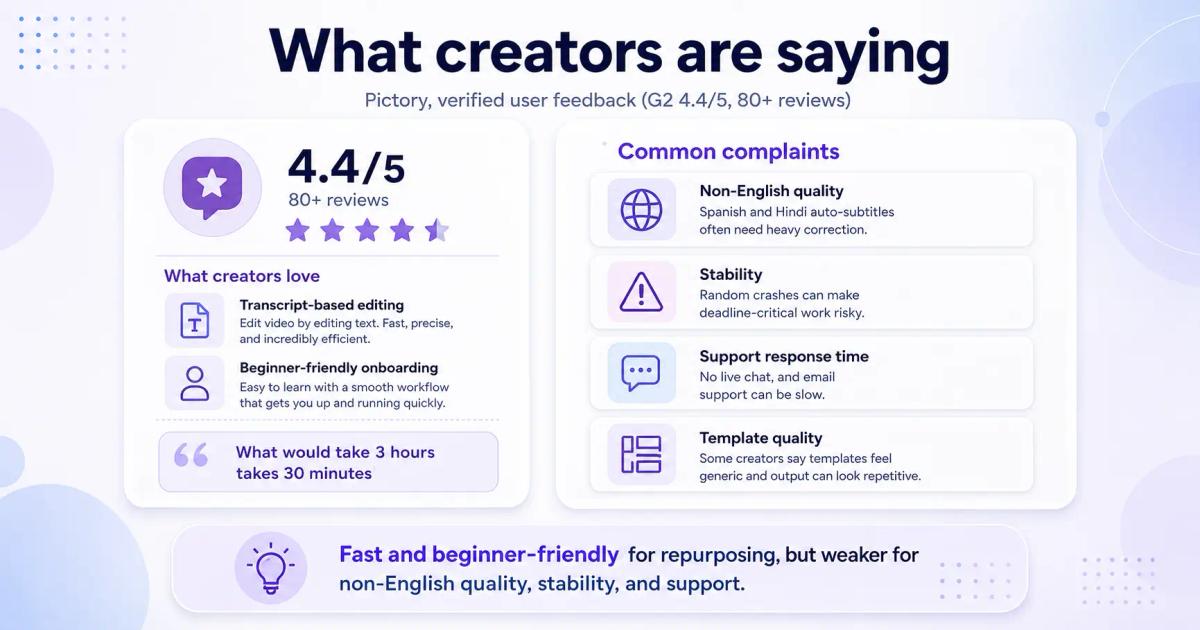
Pictory users consistently praise the transcript-based editing for speed ("what would take 3 hours takes 30 minutes") and the beginner-friendly onboarding. Negative reviews cluster around three themes:
The template selection also draws regular criticism, multiple reviewers describe it as "not impressive" and note that output can feel generic.

Frameloop's user feedback centers on the scene-based editor as the primary switching reason for creators who previously used InVideo alternatives, Pictory, or Autoshorts. The no-CC free tier consistently shows up as the reason creators try it in the first place.
The platform is newer, founded 2024, which means fewer reviews than Pictory's five-year head start. The ex-Google, ex-Adobe founding team brings credibility to the product decisions, particularly the choice to build scene-based editing from scratch rather than adapting a template system.
Pictory is a strong tool for one specific workflow: taking long-form content and turning it into shorter videos automatically. If that's your primary use case, podcast clips, blog-to-video, webinar highlights, Pictory's transcript-based editing is genuinely fast and the output is clean.
The Frameloop vs Pictory comparison gets decisive the moment you need anything more than that. Per-scene control. Multilingual output without tier restrictions. A free tier you can actually ship from. Pricing that doesn't punish iteration. Those four requirements point to Frameloop.
The AI video market is projected to reach $21.6B by 2034, growing at 46% CAGR (Grand View Research). The tools that will matter in that market aren't the ones that automate video most completely, they're the ones that give creators the control to make video worth watching.
Try Frameloop free, no credit card, video takes 15 minutes. If scene-based editing works the way this comparison says it does, you'll know within the first iteration whether this is the tool you've been looking for.

Got great video ideas but need help bringing them to life? Frameloop AI makes it easy to create professional faceless videos with AI-generated visuals, voiceovers, and editing.
Try Frameloop AI For Free